Claude Code tips and tricks
Most of this is in the docs. But docs are long and nobody reads them. So here’s the stuff I actually use, compressed.
- Mode
- Tools allow list
- PreToolUse hooks
- Plugins
- MCP
- Skills
- Slash commands
- Sub-agents
- Git worktrees
- Teams of agents
- SafeYolo(tm)
Mode
shift+tab cycles between three modes:
- Normal — Claude asks before doing anything.
- Plan — Claude plans, doesn’t act. Good for when you don’t trust the direction yet.
- Accept all edits — Claude writes files without asking. You’re still approving bash commands.
Tools allow list
If you don’t use --dangerously-skip-permissions (you shouldn’t), you’ll get asked a lot of confirmation questions.
You can build up the list organically — “yes and always allow” — or you can seed it by editing the config files directly.
Here’s a starting point for .claude/settings.json:
{
  "permissions": {
    "allow": [
      "Bash(cat *)",
      "Bash(ls *)",
      "Bash(find *)",
      "Bash(rg *)",
      "Bash(git status *)",
      "Bash(git log *)",
      "Bash(git diff *)",
      "Bash(git branch *)",
      "Bash(git show *)",
      "Bash(git worktree list *)",
      "Bash(npm test *)",
      "Bash(npm run build *)",
      "Bash(cargo build *)",
      "Bash(cargo test *)",
      "Bash(cargo check *)",
      "Bash(cargo clippy *)",
      "Bash(cargo fmt *)"
    ],
    "deny": [
      "Bash(rm *)",
      "Bash(sudo *)",
      "Bash(curl *)",
      "Bash(wget *)",
      "Bash(git push origin main *)",
      "Bash(git push --force *)",
      "Bash(gh *)"
    ]
  }
}
The allow list is read-only git, standard build tools. The deny list is anything destructive or that touches the network. Adjust for your stack.
One gotcha: Read/Edit/Write deny rules are currently unreliable (known bug). Use a PreToolUse hook instead to protect sensitive files.
Don’t use --dangerously-skip-permissions. It’s dangerous and it’s in the name.
If you must, run it in a Claude sandbox, or Docker, or a VM. Or try SafeYolo(tm).
PreToolUse hooks
A hook runs before Claude executes any tool. It receives the tool call as JSON on stdin. You respond with an exit code:
exit 0— allowexit 2— block, and Claude reads your stderr to understand why
Example: protect .env files from being read or edited.
{
  "hooks": {
    "PreToolUse": [
      {
        "matcher": "Bash|Read|Write|Edit|MultiEdit",
        "hooks": [
          {
            "type": "command",
            "command": "$CLAUDE_PROJECT_DIR/.claude/hooks/protect-secrets.sh"
          }
        ]
      }
    ]
  }
}
The script checks if the tool call targets a sensitive file, and exits 2 with a message if it does.
Plugins
Plugins bundle skills, agents, hooks, MCP config, and LSP into an installable package.
For Rust:
/plugin install rust-analyzer-lsp@claude-plugin-directory
For PR reviews:
/plugin install code-review@claude-plugin-directory
Invoke with /code-review, launches 5 Sonnet to review. Or do your own sub-agent/skill for this.
For frontend:
/plugin install frontend-design@claude-plugin-directory
MCP
For Scala: Metals can act as an MCP server since v1.5.3. Three settings in your Metals config:
"defaultBspToBuildTool": true,
"startMcpServer": true,
"mcpClient": "claude"
The Metals MCP server currently exposes 9 tools to Claude, including compiling the project, running tests, and inspecting Scala symbols. The key benefit: because Metals has its own file watcher, every change Claude makes triggers incremental compilation automatically. By the time Claude calls compile, it’s already done — returning almost instantaneously with either success or diagnostics.
Skills
Skills are just markdown. A description that tells Claude when to invoke it and what to do. Lives in .claude/skills/ (committed to your repo).
Build your own “plugins”. Each skill is a directory with SKILL.md as the entrypoint:
my-skill/
├── SKILL.md          # Main instructions (required)
├── template.md       # Template for Claude to fill in
├── examples/
│   └── sample.md     # Example output
└── scripts/
    └── validate.sh   # Script Claude can execute
Some ideas:
- lang-conventions — encode your idioms, naming patterns, module structure. Claude auto-invokes it whenever it touches files of that type.
- safety-review — error handling expectations,
unsafeusage policy, internal conventions. Complements an LSP plugin with judgment, not just diagnostics. - config-schema — for YAML/config-heavy repos, a skill that knows your schema conventions, required fields, and common patterns. Prevents Claude from generating structurally valid but semantically wrong configs.
The point: you can teach Claude the things a linter can’t catch.
Slash commands
“Light skill that you call explicitly”, are just markdown, a description that tells Claude what to do when you invoke manually. Lives in .claude/commands/.
The difference:
.claude/skills/review/SKILL.mdfires automatically when Claude detects relevant work..claude/commands/review.mdfires only when you type/review.
Both are just markdown with instructions. Different directories, different trigger behavior.
Sub-agents
Launch sub-agents that work on small tasks. They’re intended to keep verbose or specialized work out of the main context and enforce isolation. They do their thing, give feedback, close.
Some come pre-included, but you can build your own with /agents. Each agent is a markdown file in .claude/agents/ describing when to use it and what it does.
You can launch them manually (“use the reviewer agent”), or tell Claude when to do it itself in the agent’s description.
Git worktrees
You want to run multiple Claude Code sessions in the same repo, working on different branches in parallel.
git worktree add ../my-project-feature feature-branch

# two terminals:
cd ../my-project && claude          # main branch
cd ../my-project-feature && claude  # feature branch
Worktrees give every Claude session its own isolated branch and working directory, all sharing the same git history. No stashing, no context loss, no two agents stepping on each other’s files.
The real value: Claude’s understanding of your codebase is built up over a conversation. Switching branches mid-session throws that away. With worktrees, each agent stays on its branch indefinitely — each with its own chat history, its own CLAUDE.md instructions, and its own tool approvals.
For you as an individual, it means instant context switching: you just change directory.
Teams of agents
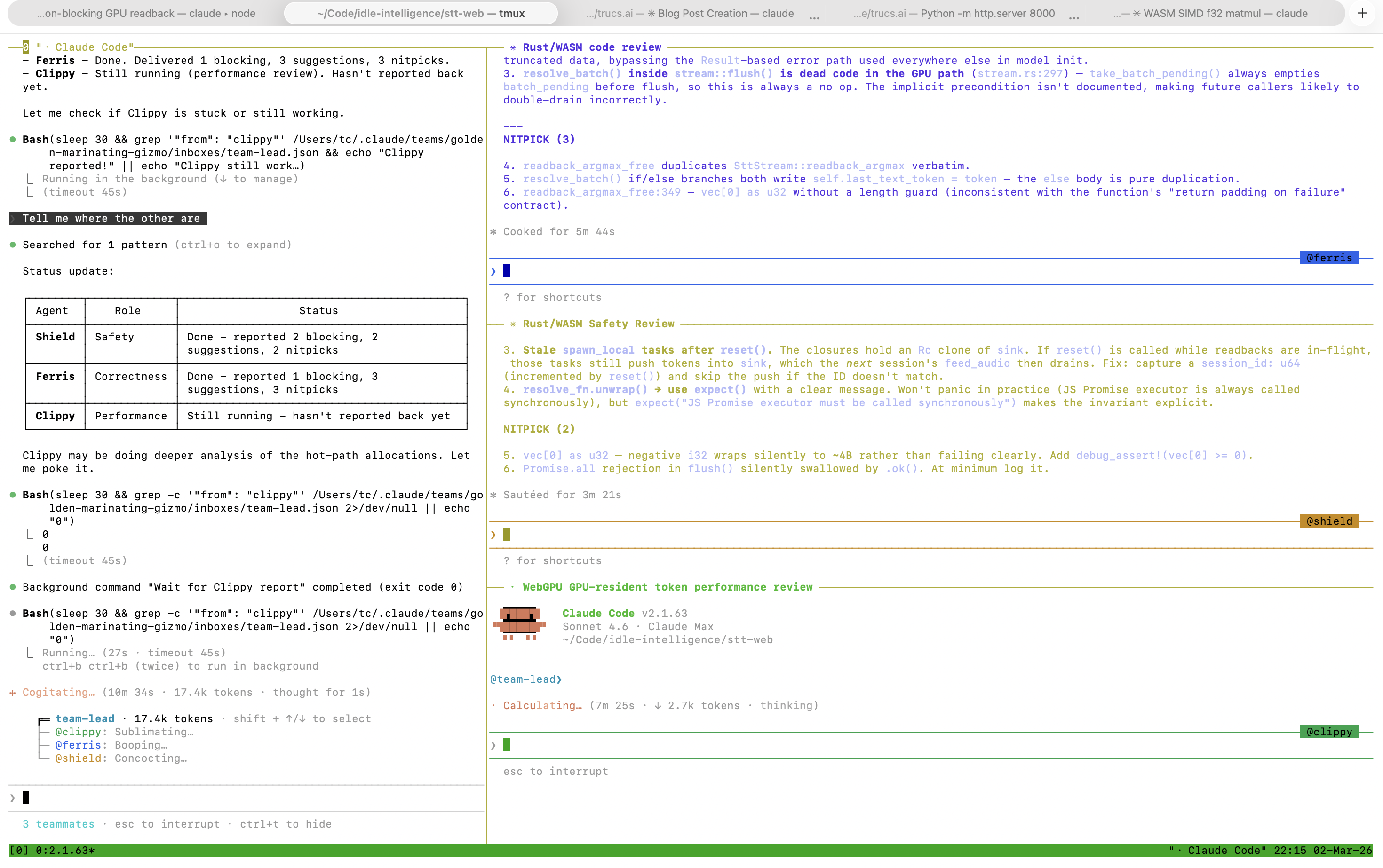
Launch a team of agents, each their own Claude session, each their own context and prompt. They communicate with each other via messages. Experimental feature (enable in global or local config).
{
  "env": {
    "CLAUDE_CODE_EXPERIMENTAL_AGENT_TEAMS": "1"
  },
  "teammateMode": "tmux"
}
Why:
- Multiple “points of view” on the same issue (for review).
- Multiple agents coordinating while working on different parts of the code (client/server, code/tests/docs, …).
- For a big feature, maintain context longer on the lead side, delegating the actual coding to teammates (consuming their context, not yours).
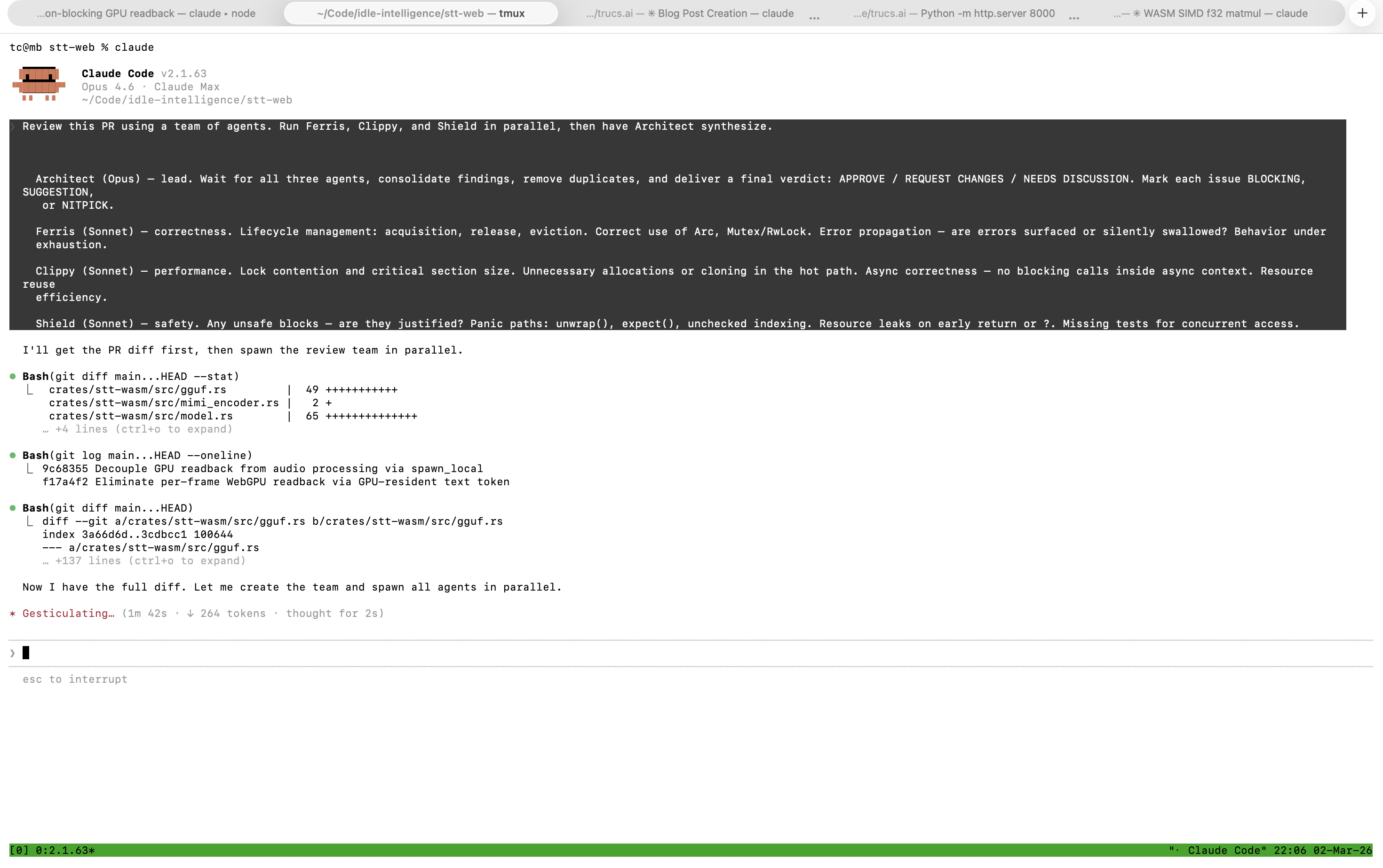
Example prompt — a Rust code review with specialized reviewers:
Review this PR using a team of agents. Run Ferris, Clippy, and Shield in parallel, then have Architect synthesize.
Architect (Opus) — lead. Wait for all three agents, consolidate findings, remove duplicates, and deliver a final verdict: APPROVE / REQUEST CHANGES / NEEDS DISCUSSION. Mark each issue BLOCKING, SUGGESTION, or NITPICK.
Ferris (Sonnet) — correctness. Lifecycle management: acquisition, release, eviction. Correct use of
Arc,Mutex/RwLock. Error propagation — are errors surfaced or silently swallowed? Behavior under exhaustion.Clippy (Sonnet) — performance. Lock contention and critical section size. Unnecessary allocations or cloning in the hot path. Async correctness — no blocking calls inside async context. Resource reuse efficiency.
Shield (Sonnet) — safety. Any
unsafeblocks — are they justified? Panic paths:unwrap(),expect(), unchecked indexing. Resource leaks on early return or?. Missing tests for concurrent access.
More fun in tmux.
But I want to YOLO: SafeYolo(tm)
Combine --dangerously-skip-permissions with a deny list, sandbox mode, and hooks. At your own risk.
{
  "permissions": {
    "deny": [
      "Bash(rm *)", "Bash(sudo *)",
      "Bash(git push origin main *)",
      "Bash(git push --force *)",
      "Bash(gh *)"
    ]
  },
  "sandbox": {
    "mode": "auto-allow",
    "allowUnsandboxedCommands": false,
    "network": {
      "allowedDomains": ["..."]
    }
  },
  "hooks": {
    "PreToolUse": ["..."]
  }
}
Launch with claude --dangerously-skip-permissions, run /sandbox on first launch (it has dependencies on Linux and WSL2). Always set "allowUnsandboxedCommands": false to prevent Claude from escaping the sandbox.
This won’t save you from prompt injection or data exfiltration. But it should be practically safe if you do it in a clean git worktree with no sensitive data, and restrict network access to domains you trust.